

Google My Business (GMB), now officially known as Google Business Profile, plays a foundational role in local digital strategy. While many businesses rely on paid ads and content-heavy SEO, GMB offers organic visibility for high-intent local searches, without added ad spend.
An optimized profile can position a business directly in front of local customers searching via Maps or local packs. But visibility alone isn’t enough.
Success with GMB depends on strategic setup, optimization, and ongoing activity like posting, reputation management, and data analysis.
This guide will cover more than just profile setup. It will walk through GMB’s most powerful features, explain how to align them with broader local SEO efforts, and highlight practical, real-world strategies to increase foot traffic, calls, and conversions.
Whether managing a single-location business or overseeing multiple franchises, this in-depth approach can ensure GMB works as a lead-generation asset.
Table of Contents
Why Google My Business Matters for Local SEO
Google Business Profile is one of the strongest organic visibility tools in local SEO. It feeds data directly into Google’s Knowledge Panel, Maps, and Local Pack, which are sections of search that command high click-through and conversion rates.
When someone searches for a business category near them, the results displayed are primarily determined by proximity, relevance, and prominence, all of which GMB influences directly.
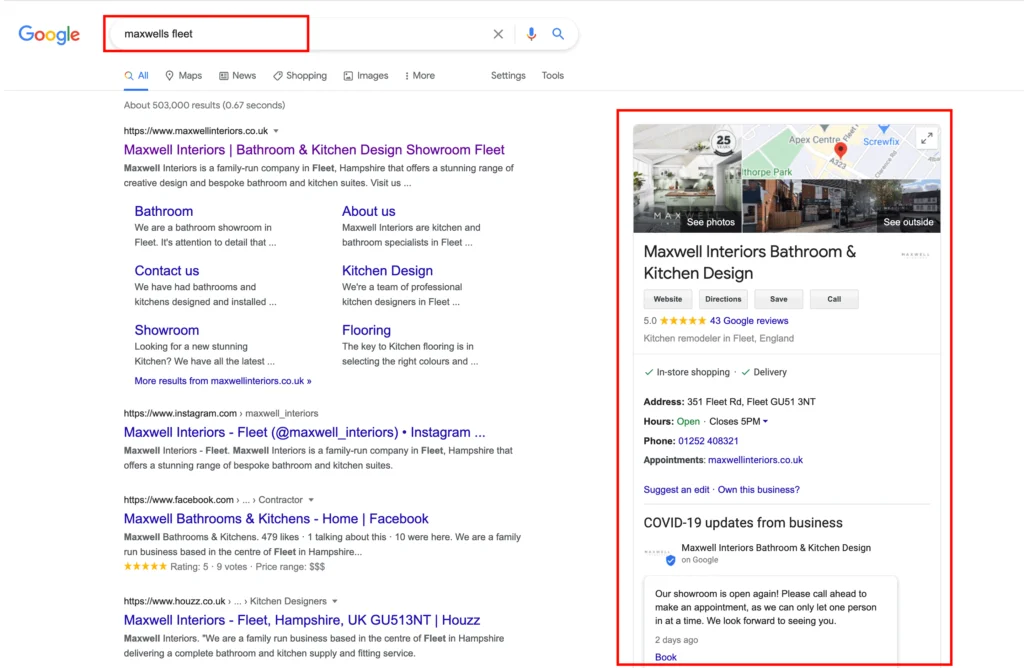
Unlike general SEO, where websites must compete nationally or globally, GMB narrows the field to the hyperlocal. It allows businesses to show up for queries like “dentist near me” or “24/7 plumbing in Houston,” even if their website has low domain authority.
For many businesses, this local visibility translates into a steady stream of qualified leads.
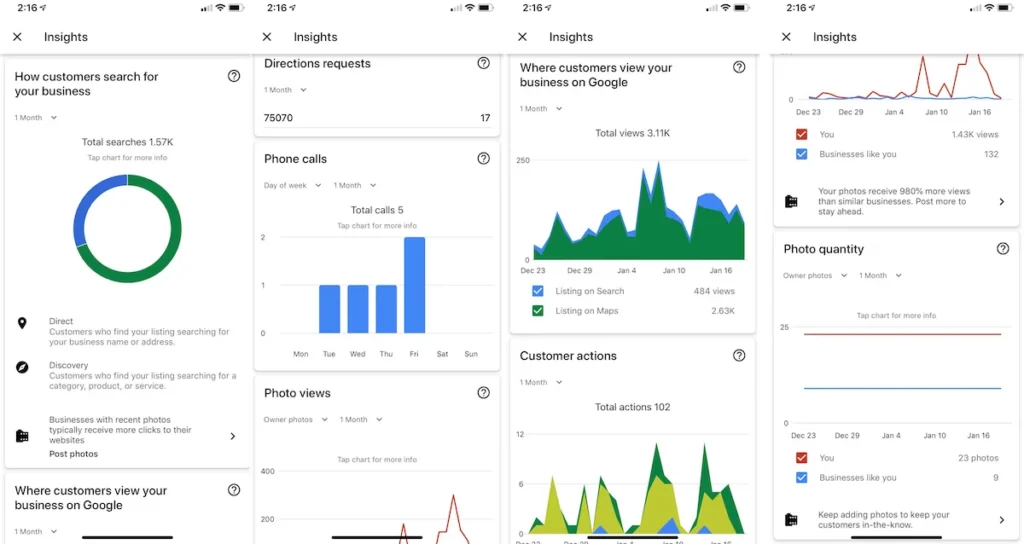
Customer actions within the listing (such as requesting directions, calling, or browsing photos) are measurable through GMB Insights. These behaviors help refine strategy and adjust for seasonal trends or campaign impact.
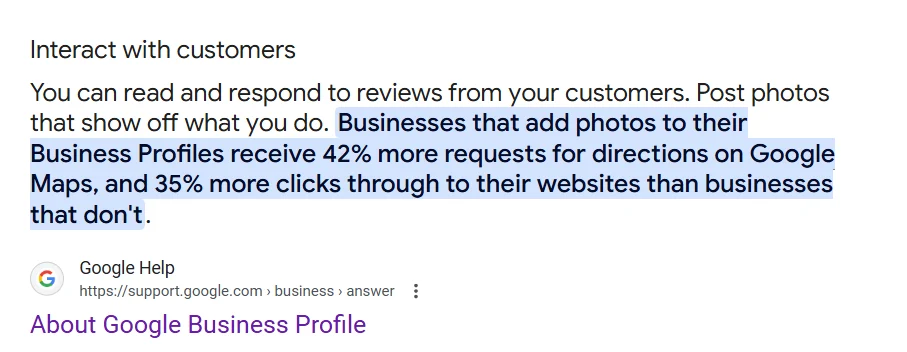
Photos, reviews, business hours, and posts all influence how often a listing appears and how users engage with it. According to Google, listings with photos and complete information receive 42% more direction requests and 35% more click-throughs to websites than those without.
For businesses with physical locations or service areas, optimizing GMB is fundamental to local search dominance. It can become a traffic-driving hub when actively managed, integrated with other SEO efforts, and backed by real customer interaction.
Setting Up and Verifying Your GMB Profile
Although creating a GMB profile appears straightforward, foundational setup decisions impact long-term search visibility.
To begin, you must sign in to the Google Business Profile Manager and claim your business location. From there, the setup process branches depending on the type of business: brick-and-mortar, hybrid, or service-area based.
Before verification, input accuracy is essential. Misaligned NAP (Name, Address, Phone) details across directories can damage ranking potential. Another ranking signal is choosing the most relevant primary category (not just a broad industry term).
For instance, selecting “Emergency Plumber” instead of just “Plumber” may surface the listing in searches with a more urgent intent.
Here are some setup priorities to focus on:
- Select the precise business category and add secondary categories only if directly relevant.
- Enter the address, service areas, and contact details exactly as they appear on your website and citations.
- Use a consistent business name. Avoid keyword stuffing as it violates guidelines and can trigger penalties.
- Add business hours, including holiday and special hours, to enhance trust and visibility.
- Enable messaging if your business can respond promptly to inquiries.
- Upload a high-resolution logo and cover image that match branding across platforms.
Verification options include postcard (default), phone, email, or video recording, depending on Google’s eligibility. Businesses operating from home or offering mobile services may need to follow stricter verification methods, including short video walkthroughs of signage and tools.
Google Business Profile Set Up: 2025 Step-by-Step Tutorial
Once verified, listings go live and are eligible to appear in local results. However, a verified profile is only the baseline. Optimization and engagement begin immediately after verification to improve local rankings and conversions.
Optimizing Your GMB Profile for Search
Once the profile is verified, optimization becomes the key differentiator between merely appearing in search results and consistently ranking in the top 3 local pack positions.
It involves filling out every section and aligning it with user behavior and search intent.
Optimize for Category Relevance and Attributes
Your primary category signals to Google what kind of searches your business should appear in. Secondary categories expand visibility, but only include them if they directly support your main service.
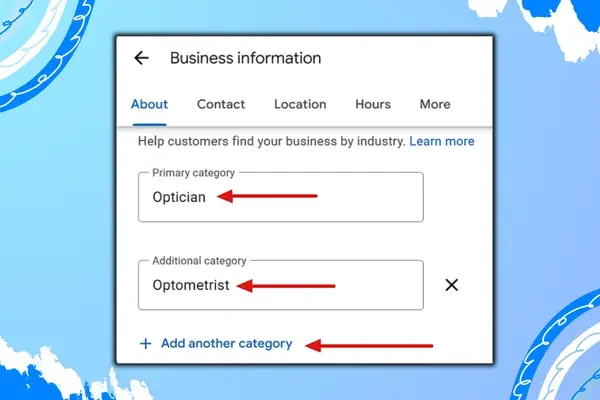
Image Source: Localtrifo
Additionally, use all relevant business attributes, such as “wheelchair accessible,” “free Wi-Fi,” or “LGBTQ+ friendly,” which can influence both search filters and user trust.
Strengthen Content with a Keyword Strategy
Your business description, services, and product sections should include keywords naturally. Avoid keyword stuffing. Think in terms of search queries. Include specific offerings like “root canal treatment” or “hydro jetting” if those match your services.
Descriptions must be factual and avoid promotional language. Prioritize clarity and relevance, as Google’s algorithm scans this content for ranking signals.
Keep Visual Elements Fresh and Branded
Regularly updated images can influence rankings. Upload photos showing the interior, exterior, staff, products, or completed work.
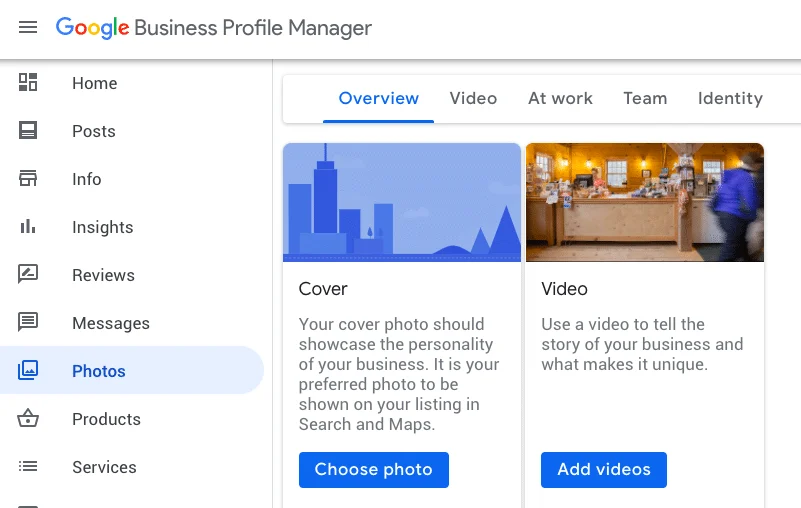
Geotagging isn’t officially supported, but location-relevant imagery helps with engagement. Also, encourage customers to upload their own photos, which can increase trust and authenticity.
Leverage the Q&A Section
Proactively add and answer questions in the Q&A section. It helps control the narrative and ensures users get accurate information rather than relying on peer answers that may be outdated or misleading.
Add FAQs to Google Business Profile | Setup Questions & Answers on Google My Business Listing
Review Management and Response Strategy
Reviews are among the strongest trust signals and affect both rankings and conversions. Prompt customers for reviews with a direct link. Respond to all positive and negative reviews using professional, keyword-aligned language where appropriate.
Leveraging GMB Posts for Engagement
GMB posts offer a low-effort way to keep your profile active while engaging local searchers with time-sensitive updates, offers, and announcements. They appear prominently in the business profile and can influence both visibility and user action.
Here are the primary types of GMB posts businesses can create:
- What’s New: For updates, events, or general announcements
- Offers: Highlighting discounts, promo codes, or seasonal deals
- Events: Featuring start/end times and event-specific info
- Product: Promoting individual items with a photo, description, and price
Effective post copy should be concise, action-driven, and include a clear call to action (CTA). For example, instead of simply stating, “We’re open this weekend,” use “Visit us this weekend for 15% off—click to get directions.”
Use high-quality visuals that match your brand identity. Stock photos reduce authenticity and may be ignored. Posts should be 150–300 words, ideally incorporating keywords without disrupting readability.
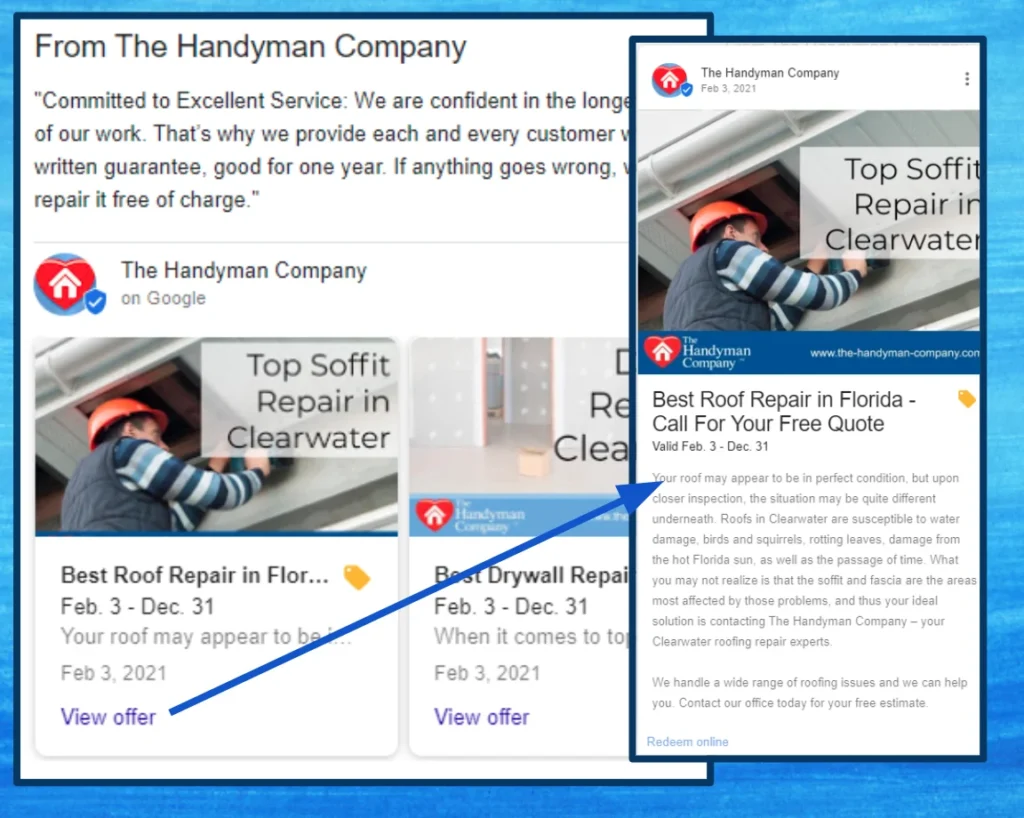
Image Source: SterlingSky
Timing also matters. While posts remain visible for 7 days (except event posts, which last through the event), they tend to see the most engagement in the first 48 hours. Posting midweek (Tuesday–Thursday) often yields better results for most industries.
Maintain consistency by publishing at least once a week. An active posting strategy signals to Google that your business is engaged and up to date, which helps with local trust and ranking.
Collecting and Managing Reviews Effectively
Online reviews are one of the strongest ranking factors for local SEO and influence purchasing decisions more than almost any other metric. A steady stream of high-quality, authentic reviews helps your business stand out while reinforcing trust in competitive local markets.
To build a strong review profile, businesses must go beyond waiting passively for feedback. Create a system that encourages satisfied customers to leave a review shortly after their experience, when their memory and engagement are fresh.
Use these strategies for better review collection and management:
- Share a direct review link via email, text, or QR code.
- Train staff to request reviews during positive interactions.
- Follow up with thank-you messages or small incentives (where permitted).
- Display GMB reviews prominently on your website and social platforms.
Responding to reviews (both positive and negative) is essential. It shows prospective customers that your business is engaged and values feedback.
Keep responses polite, professional, and personalized. For positive reviews, thank the reviewer and mention a specific detail. For negative feedback, acknowledge the issue and offer a clear next step or resolution.
Avoid using templated responses. Repetitive replies may appear insincere and damage credibility.
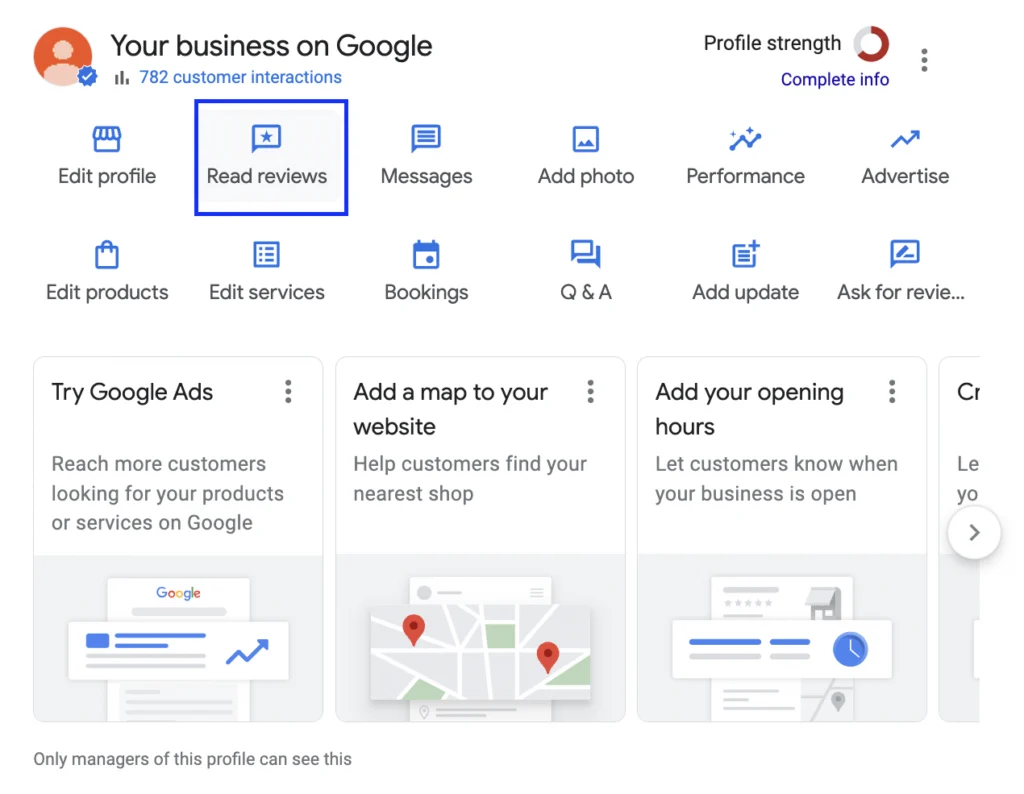
Regular monitoring is also important. Use Google’s notifications or third-party tools to stay on top of new reviews, and act quickly if you receive spam or false content by flagging it through your GMB dashboard.
Over time, a well-managed review strategy will improve both visibility and customer confidence, directly impacting local traffic and conversions.
Using GMB Insights to Drive Strategy
GMB Insights offers valuable data on how users interact with your business listing, giving clues into search behavior and profile performance. For any local strategy to succeed, analyzing this data regularly is non-negotiable.
Key metrics to track include:
- Total searches
- How customers find your listing (direct vs. discovery)
- Actions taken (calls, website clicks, direction requests)
- Photo views
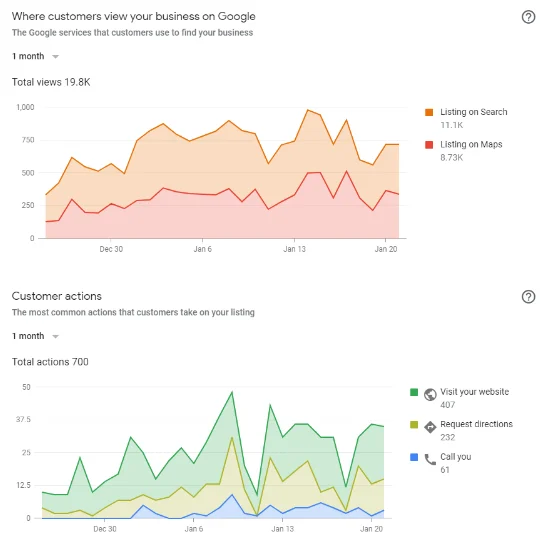
Monitoring these indicators can help spot patterns, identify what’s working, and adjust your tactics accordingly.
For example, if views spike after a post or photo update, you’ll know to repeat that strategy. If direction requests drop, reevaluate your location info or local relevance.
The more you monitor these insights, the more data-driven and successful your local SEO strategy will become.
Integrating GMB with Other Local SEO Strategies
Google My Business performs best when integrated into a broader local SEO ecosystem. Treating it as a standalone asset limits its potential. Instead, synchronize it with complementary strategies to build local authority and increase visibility.
Local Citations and NAP Consistency
Consistency across online directories such as Yelp, Bing Places, and Apple Maps reinforces trust signals. Ensure your Name, Address, and Phone Number (NAP) match exactly across all platforms, including your website footer and contact pages.
Localized Content Strategy
Publishing location-specific content (e.g., city-based landing pages, community news, or event recaps) can drive organic traffic and improve relevance for geo-specific searches. Embed local keywords naturally and link to your GMB profile where appropriate.
Backlink Acquisition from Local Sources
Earning links from local newspapers, blogs, or community partners can strengthen domain authority and complement your GMB presence. These hyperlocal backlinks signal to Google that your business is trusted within the geographic area.
Schema Markup Integration
Adding local business schema to your website enhances how your pages appear in search. Rich snippets and better context make it easier for search engines to associate your GMB listing with your website and content.
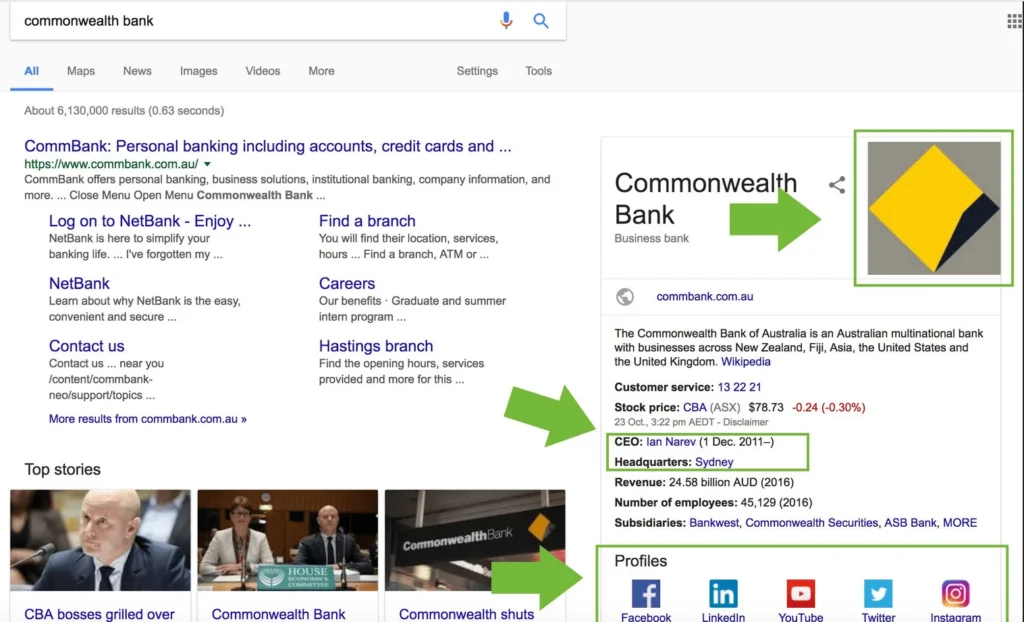
A multi-channel, interconnected strategy positions your business more competitively in the local pack and map results. GMB alone won’t guarantee growth, but combined with technical SEO and content alignment, it creates a long-term impact.
Advanced Features and Hidden Opportunities
Many GMB users overlook features that, when used properly, can offer additional reach and engagement. These lesser-used tools can refine targeting and enhance user experience:
- Services and Products Tabs: Perfect for service-based businesses or those without eCommerce, these sections allow listings of offerings with descriptions, prices, and photos, improving relevance in search.
- Q&A Section Management: Preemptively adding FAQs helps shape customer expectations. Monitoring this section also allows direct public communication, improving transparency.
- Chat and Messaging Features: Enabling GMB messaging allows prospects to connect instantly from search. Quick response times build trust and often convert faster than traditional channels.
- Booking Integration: Businesses offering appointments or reservations can streamline conversions by connecting supported booking platforms directly through GMB.
- Multiple Location Management: For businesses with branches, GMB’s bulk location management and chain-specific tools simplify updates while preserving individual optimization.
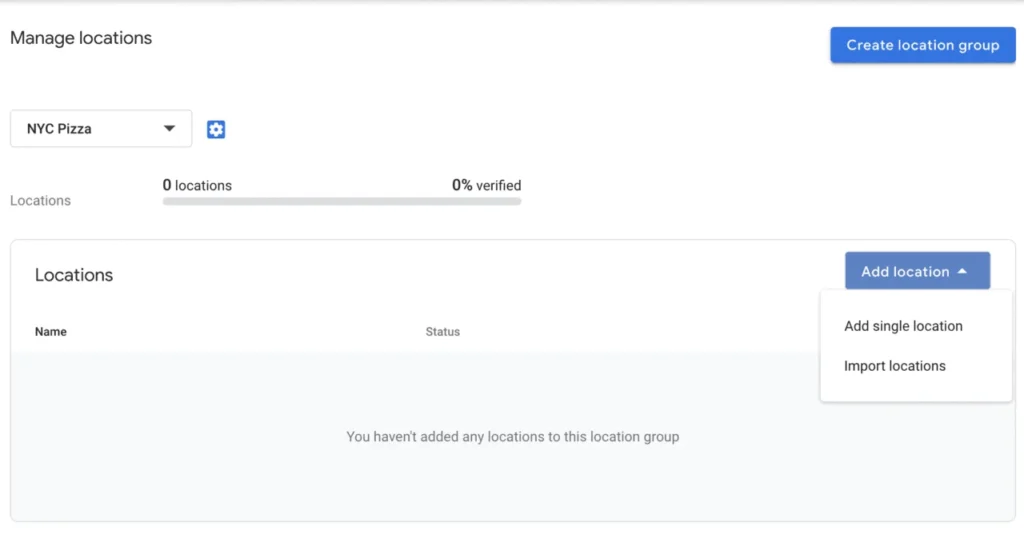
- Profile Performance via UTM Parameters: Custom URLs with UTM tags can help track clicks from GMB to your site within Google Analytics, refining attribution in your marketing reports.
Case Studies and Real-Life Success Stories
GMB’s impact is already driving measurable results for many businesses. Below are real examples of companies that used GMB strategically to boost local visibility, engagement, and conversions.
Joy Hawkins and Sterling Sky’s Client Success
Joy Hawkins, a well-known local SEO expert and founder of Sterling Sky, shared a case study of a law firm that increased its discovery searches by 376% in four months. The strategy focused on optimizing categories, updating the business description, and adding localized photos.
Ep. 27: Joy Hawkins, Sterling Sky – Local SEO for Law Firms
Google Posts were published regularly, and the firm responded to every review. It resulted in not only a traffic boost but also significantly more phone calls from Google Maps.
Whitespark’s Research and Results
Whitespark, a leading local SEO tool provider, published insights on a Canadian dental clinic that saw a 50% increase in website visits from GMB alone.
The clinic optimized its GMB categories, added structured services, and uploaded geotagged images. It also encouraged satisfied patients to leave detailed reviews and used the Q&A section to address common concerns, building trust in advance.
Real Estate Agent Case by BrightLocal
BrightLocal documented cases in which many businesses achieved more views only within a few months by updating their GMB regularly with new listings and using UTM-tagged links to track engagement.
They used Google Posts for new product or service highlights and offered direct booking links. The clear CTA and active profile helped them dominate local search results, even over larger agencies.
These examples show how businesses of any size can see tangible results when they treat GMB as a core marketing channel rather than a passive listing.
Common GMB Mistakes and How to Avoid Them
Even seasoned marketers make avoidable errors on GMB. Avoiding these mistakes can preserve your visibility and trustworthiness.
Staying proactive and precise is key to preventing these pitfalls and ensuring long-term GMB success.
- Inconsistent NAP details across directories weaken local SEO signals. Keep contact info uniform everywhere.
- Using the wrong primary category limits search visibility. Choose the most accurate, specific category.
- Ignoring reviews (especially negative ones) creates distrust. Always respond professionally.
- Posting content irregularly results in less engagement. Maintain a consistent schedule.
- Leaving Q&A unmanaged allows misinformation to spread. Monitor and answer proactively.
- Using stock images instead of real business photos lowers user trust and click-throughs.
- Neglecting insights means missing performance clues. Check analytics monthly for actionable data.
Maintenance and Ongoing Optimization Tips
A well-optimized Google Business Profile isn’t something you set and forget. Continuous monitoring and updates are necessary to maintain visibility and relevance in local search results.
Here are some effective practices to keep a profile performing at its best:
- Update Business Hours Regularly: Reflect any seasonal or holiday hours to avoid misleading potential customers.
- Refresh Photos Frequently: Add new photos showcasing products, services, staff, or events to keep the profile looking active.
- Respond to Reviews Promptly: Engage with both positive and negative reviews to demonstrate responsiveness and customer care.
- Monitor Questions and Answers: Provide accurate answers and monitor for spam or misleading content in the Q&A section.
- Post Weekly Updates: Keep customers informed with weekly GMB posts featuring offers, news, or events.
- Check for Profile Suggestions: Google may auto-suggest edits, so review them regularly to ensure the profile remains accurate.
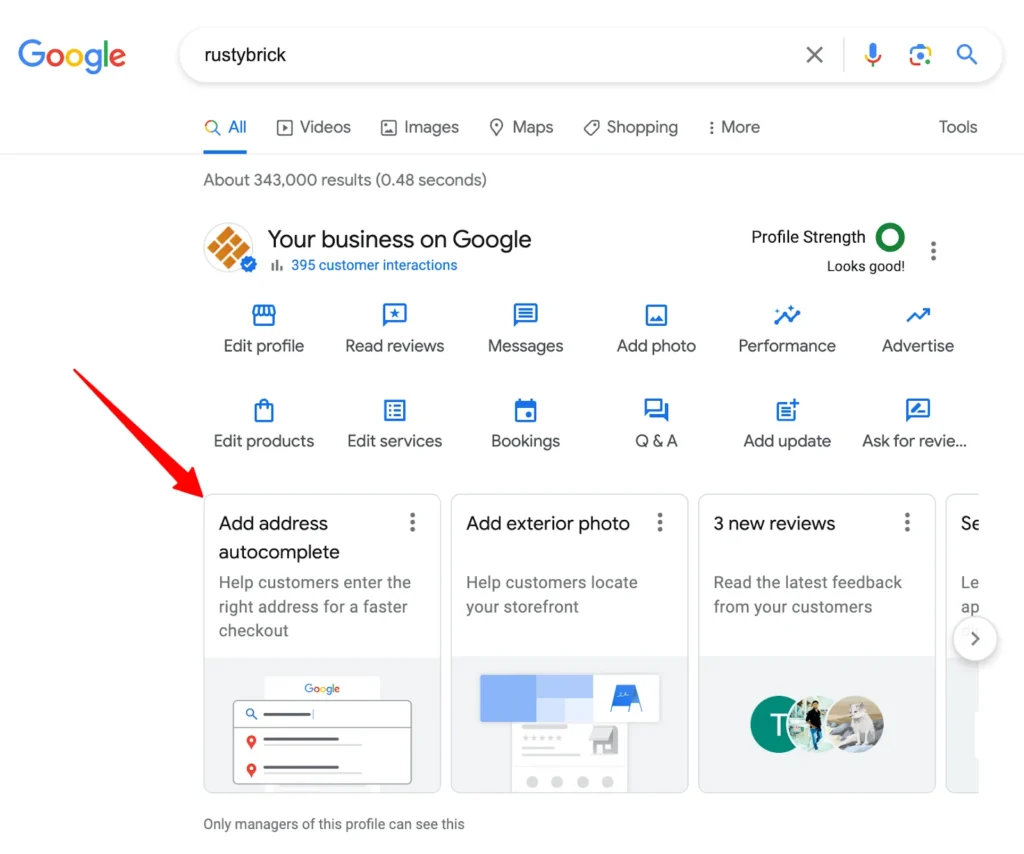
- Use UTM Parameters for Links: Track traffic and engagement from GMB to your site through analytics.
- Revisit Categories and Services Quarterly: Update service areas, offerings, or categories as your business evolves.
Consistent activity not only helps rankings but also builds trust with your local audience.
Tools and Resources to Help Manage GMB
Below are some of the tools that can assist you with your local SEO campaigns using Google Business Profile.
Google Business Profile Manager
The core dashboard provided by Google lets businesses edit information, upload media, respond to reviews, create posts, and view insights. It’s essential for basic and advanced profile management.
Canva
Canva helps create visually appealing graphics for GMB posts, updates, and promotions. Templates designed for social media translate well to GMB, maintaining brand consistency and engagement.
How to Create Google Posts Using Canva // EASY STRATEGY
Whitespark and BrightLocal
Both platforms offer robust local SEO toolsets. Whitespark excels in local citation management and GMB optimization audits, while BrightLocal offers rank tracking, review monitoring, and audit reports. Together, they’re valuable for businesses serious about dominating local search.
Conclusion and Action Plan
Google My Business is a dynamic tool that drives targeted, local traffic. To stay ahead, prioritize profile accuracy, frequent updates, and regular engagement. Use GMB Insights and various suitable external tools to shape a data-driven local strategy.
Set aside time weekly or monthly to review and update the profile. Monitor engagement metrics and adjust tactics accordingly. With the right maintenance and optimization routine, GMB can become one of the most valuable local visibility channels for any business.
Start with a thorough audit of your current Google profile. Then, build forward, strategically and consistently.